Amazon Autocomplete API Documentation
The Amazon Autocomplete API returns the suggestions Amazon's search box shows while a keyword is being typed,
in the order Amazon shows them, on any of 23 Amazon marketplaces. Most are search queries, and any
value can be passed as the q of the
Amazon Search API to run that search.
API Parameters
Search Query
-
- Name
-
q - Required
- Required
- Description
-
The partial or full keyword to autocomplete (e.g.
coffee). Returns the suggestions Amazon's search box shows for that text, in the order Amazon shows them. Up to200characters, with at least one letter or number. A trailing space asks for the next word, soiphone 17suggests what usually follows it. Pass any suggestion'svalueas theqof the Amazon Search API to run that search.
Localization
-
- Name
-
amazon_domain - Required
- Optional
- Description
-
The Amazon marketplace whose search box the suggestions come from. Check the full list of supported Amazon domains. Default:
amazon.com.
Filters
-
- Name
-
amazon_department - Required
- Optional
- Description
-
The department to get suggestions in, as Amazon's search box shows them once a department is picked from its dropdown (e.g.
stripbooksfor Books on amazon.com). Each marketplace offers its own departments, so check the departments of each marketplace. Default:aps(All Departments). The Amazon Search API filters bycategory_idrather than by department.
Engine
-
- Name
-
engine - Required
- Required
- Description
-
Parameter defines an engine that will be used to retrieve real-time data. It must be set to
amazon_autocomplete.
API key
-
- Name
-
api_key - Required
- Required
- Description
-
The
api_keyauthenticates your requests. Use it as a query parameter (https://www.searchapi.io/api/v1/search?api_key=YOUR_API_KEY) or in the Authorization header (Bearer YOUR_API_KEY).
Zero Data Retention
-
- Name
-
zero_retention - Enterprise Only
- Enterprise Only
- Required
- Optional
- Description
-
Set this parameter to
trueto disable all logging and persistent storage. No request parameters, HTML, or JSON responses are stored or logged. Suitable for high-compliance use cases. Debugging and support may be limited while enabled.
API Examples
Suggestions
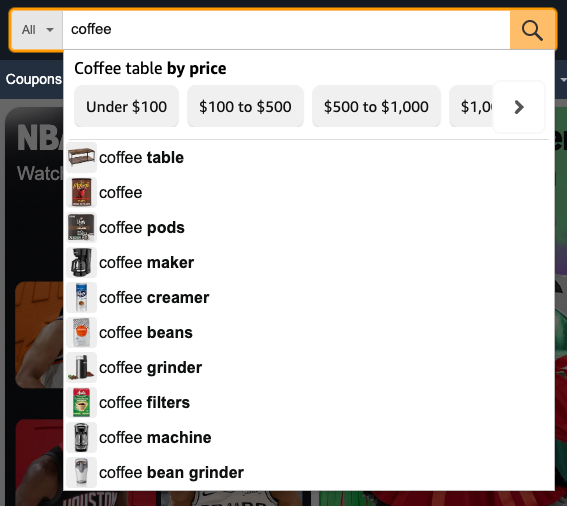
Each suggestion carries its position in the search box, its type and its
value. A query suggestion links to its Amazon search and, when Amazon shows one,
to a thumbnail. Amazon also places a few extras in the box: a refinement row
such as "Coffee table by price" with its options, a store row such as a brand's
Amazon store or Audible, or a shortcut card to an Amazon page such as "Your orders" or
"Whole Foods Market". Each option carries the value and, for a price or size choice, the
rh to pass as q and rh to the Amazon Search API, and a shortcut card to
a product carries its asin for the
Amazon Product API.
search_information.query_displayed is the query as Amazon read it,
lowercased and sometimes rewritten.
https://www.searchapi.io/api/v1/search?engine=amazon_autocomplete&q=coffee- Python
- Node
- Ruby
- Java
- Go
- PHP
- Bash
- R
- Kotlin
- Swift
- C#
- C
- C++
- requests
import requests

url = "https://www.searchapi.io/api/v1/search"
params = {
  "engine": "amazon_autocomplete",
  "q": "coffee"
}

response = requests.get(url, params=params)
print(response.text)
{
  "search_metadata": {
    "id": "search_isVM1AYJfBwUzuREA4Bw9zR2",
    "status": "Success",
    "created_at": "2026-10-23T13:21:42Z",
    "request_time_taken": 1.83,
    "parsing_time_taken": 0.01,
    "total_time_taken": 1.84,
    "request_url": "https://www.amazon.com/s?k=coffee",
    "html_url": "https://www.searchapi.io/api/v1/searches/search_isVM1AYJfBwUzuREA4Bw9zR2.html",
    "json_url": "https://www.searchapi.io/api/v1/searches/search_isVM1AYJfBwUzuREA4Bw9zR2"
  },
  "search_parameters": {
    "engine": "amazon_autocomplete",
    "q": "coffee",
    "amazon_domain": "amazon.com",
    "amazon_department": "aps"
  },
  "search_information": {
    "query_displayed": "coffee",
    "department": "aps"
  },
  "suggestions": [
    {
      "position": 1,
      "type": "refinement",
      "value": "coffee table",
      "title": "Coffee table by price",
      "options": [
        {
          "title": "Under $100",
          "value": "coffee table",
          "rh": "n:1063318,p_n_price:8570764011",
          "link": "https://www.amazon.com/s?k=coffee+table&rh=n%3A1063318%2Cp_n_price%3A8570764011&rnid=8570763011&nav_..."
        },
        {
          "title": "$100 to $500",
          "value": "coffee table",
          "rh": "n:1063318,p_n_price:8570765011",
          "link": "https://www.amazon.com/s?k=coffee+table&rh=n%3A1063318%2Cp_n_price%3A8570765011&rnid=8570763011&nav_..."
        },
        "..."
      ]
    },
    {
      "position": 2,
      "type": "query",
      "value": "coffee table",
      "link": "https://www.amazon.com/s?k=coffee+table",
      "thumbnail": "https://m.media-amazon.com/images/I/41Q0IEeqGBL.__AC_SL75__.jpg"
    },
    {
      "position": 3,
      "type": "query",
      "value": "coffee",
      "link": "https://www.amazon.com/s?k=coffee",
      "thumbnail": "https://m.media-amazon.com/images/I/41T+FnDEVxL.__AC_SL75__.jpg"
    },
    "..."
  ]
}
Department Suggestions
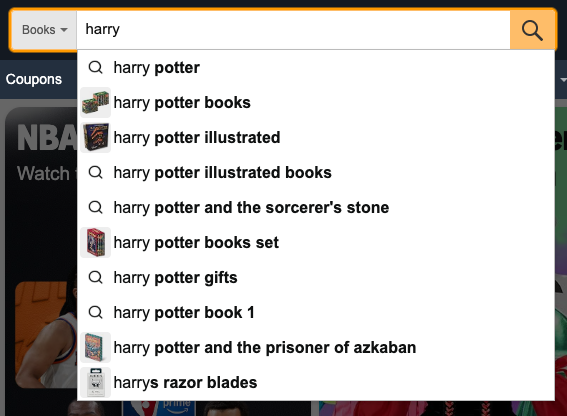
With amazon_department set, the suggestions are the ones Amazon's search box shows inside that
department, and each link opens the search in it. When the department has none for the query,
Amazon can offer suggestions from All Departments instead: search_information.department is then
aps and their links search the whole marketplace.
https://www.searchapi.io/api/v1/search?amazon_department=stripbooks&engine=amazon_autocomplete&q=harry- Python
- Node
- Ruby
- Java
- Go
- PHP
- Bash
- R
- Kotlin
- Swift
- C#
- C
- C++
- requests
import requests

url = "https://www.searchapi.io/api/v1/search"
params = {
  "engine": "amazon_autocomplete",
  "q": "harry",
  "amazon_department": "stripbooks"
}

response = requests.get(url, params=params)
print(response.text)
{
  "search_metadata": {
    "id": "search_BX2oxXO6Ae3XpwmRB6UfDWqz",
    "status": "Success",
    "created_at": "2026-10-23T13:21:44Z",
    "request_time_taken": 1.42,
    "parsing_time_taken": 0.0,
    "total_time_taken": 1.42,
    "request_url": "https://www.amazon.com/s?k=harry&i=stripbooks",
    "html_url": "https://www.searchapi.io/api/v1/searches/search_BX2oxXO6Ae3XpwmRB6UfDWqz.html",
    "json_url": "https://www.searchapi.io/api/v1/searches/search_BX2oxXO6Ae3XpwmRB6UfDWqz"
  },
  "search_parameters": {
    "engine": "amazon_autocomplete",
    "q": "harry",
    "amazon_domain": "amazon.com",
    "amazon_department": "stripbooks"
  },
  "search_information": {
    "query_displayed": "harry",
    "department": "stripbooks"
  },
  "suggestions": [
    {
      "position": 1,
      "type": "query",
      "value": "harry potter",
      "link": "https://www.amazon.com/s?k=harry+potter&i=stripbooks"
    },
    {
      "position": 2,
      "type": "query",
      "value": "harry potter books",
      "link": "https://www.amazon.com/s?k=harry+potter+books&i=stripbooks",
      "thumbnail": "https://m.media-amazon.com/images/I/41nnoHnj2-L.__AC_SL75__.jpg"
    },
    {
      "position": 3,
      "type": "query",
      "value": "harry potter illustrated",
      "link": "https://www.amazon.com/s?k=harry+potter+illustrated&i=stripbooks",
      "thumbnail": "https://m.media-amazon.com/images/I/51teg98MFNL.__AC_SL75__.jpg"
    },
    "..."
  ]
}