Google Shorts API Documentation
The Google Shorts API offers retrieves short video results from the most popular sources, like TikTok, Instagram, YouTube, Facebook, etc. It categorizes similar shorts, and presents them according to each user's search query. The API offers access to the specific source for each short video and allows you to filter by time period, captions presence, and more.
By default, Google now returns each result's link as an encrypted redirect (https://www.google.com/goto?url=...). If you need the direct destination URL, add link=resolved and we resolve each redirect for you.
API Parameters
Search Query
-
- Name
-
q - Required
- Required
- Description
-
This parameter is used for the terms you want to search on Google Videos. Queries can include operators and advanced filters like "cooking tutorials",
site:,inurl:,intitle:,as_dt, oras_eq.
Device
-
- Name
-
device - Required
- Optional
- Description
-
The default parameter
desktopdefines the search on a desktop device. Themobileparameter defines the search on a mobile device. Thetabletparameter defines the search on a tablet device.
Geographic Location
-
- Name
-
location - Required
- Optional
- Description
-
This parameter is used to specify the canonical location of the search. For exact targeting or to see all available options, check out the Locations API. If multiple locations match your input, the most popular one will be selected.
-
- Name
-
uule - Required
- Optional
- Description
-
This parameter sets the exact Google-encoded location for the search, and
uuleandlocationcannot be used at the same time. SearchApi builds it for you when you use thelocationparameter, but you can provide your own if you want precise control.
Localization
-
- Name
-
google_domain - Deprecated
- Deprecated
- Required
- Optional
- Description
-
As of Apr 15, 2025, Google began phasing out country code top-level domains (ccTLDs). Users using the search bar or visiting local domains like
google.deorgoogle.co.ukare now automatically redirected togoogle.com. For localized searches, use thegl(country),hl(language) or other localization parameters instead. Learn more in Google's official announcement. See the full list of supported Google domains.
-
- Name
-
gl - Required
- Optional
- Description
-
The default parameter
usdefines the country of the search. Check the full list of supported Googleglcountries.
-
- Name
-
hl - Required
- Optional
- Description
-
The default parameter
endefines the interface language of the search. Check the full list of supported Googlehllanguages.
-
- Name
-
cr - Required
- Optional
- Description
-
The cr parameter restricts search results to documents originating in a particular country. Google determines the country of a document by the top-level domain (TLD) of the document's URL or by Web server's IP address geographic location. Check the full list of supported Google
crcountries.
Filters
-
- Name
-
nfpr - Required
- Optional
- Description
-
This parameter controls whether results from queries that have been auto-corrected for spelling errors are included. To exclude these auto-corrected results, set the value to
1. By default, the value is0, meaning auto-corrected results are included.
-
- Name
-
filter - Required
- Optional
- Description
-
This parameter controls whether the "Duplicate Content" and "Host Crowding" filters are enabled. Set the value to
1to enable these filters, which is the default setting. To disable these filters, set the value to0.
-
- Name
-
safe - Required
- Optional
- Description
-
This parameter toggles the SafeSearch feature for the results. SafeSearch operates by filtering out adult content from your search results. Google's filters use proprietary technology to check keywords, phrases and URLs. While no filters are 100 percent accurate, SafeSearch will remove the overwhelming majority of adult content from your search results. Supported values are
activeto enable strict SafeSearch,blurto blur explicit images, andoffto disable SafeSearch. By default, the value isblur.
-
- Name
-
tbs - Required
- Optional
- Description
-
This parameter restricts results to URLs based on encoded values.
-
- Name
-
time_period - Required
- Optional
- Description
-
This parameter restricts results to URLs based on date. Supported values are:
last_hour- data from the past hour.last_day- data from the past 24 hours.last_week- data from the past week.last_month- data from the past month.last_year- data from the past year.
tbsparameter.
-
- Name
-
quality - Required
- Optional
- Description
-
This parameter restricts results to URLs based on video quality. By default, all videos are returned. To retrieve only videos with high quality,
highparam should be used.
Note: this parameter is not compatible with a customtbsparameter.
-
- Name
-
captioned - Required
- Optional
- Description
-
This parameter restricts results to URLs based on video captions. By default, all videos are returned. To retrieve only videos with closed caption, set this parameter to
closed.
Note: this parameter is not compatible with a customtbsparameter.
-
- Name
-
source - Required
- Optional
- Description
-
This parameter restricts results to URLs based on source. Supported values are:
instagram,tiktok,youtube,facebook,x,bluestone.
Note: this parameter is not compatible with a customtbsparameter.
Result Links
-
- Name
-
link - Required
- Optional
- Description
-
Controls how result links are returned. By default (
raw), each resultlinkis Google's redirect URL (https://www.google.com/goto?url=...). Set it toresolvedto return the direct destination URL instead. Resolving follows each redirect, so it may add latency to the response.
Pagination
-
- Name
-
page - Required
- Optional
- Description
-
This parameter indicates which page of results to return. By default, it is set to
1. The maximum value is82due to Google's limitation to return only the first 1000 results.
Engine
-
- Name
-
engine - Required
- Required
- Description
-
Parameter defines an engine that will be used to retrieve real-time data. It must be set to
google_shorts.
API key
-
- Name
-
api_key - Required
- Required
- Description
-
The
api_keyauthenticates your requests. Use it as a query parameter (https://www.searchapi.io/api/v1/search?api_key=YOUR_API_KEY) or in the Authorization header (Bearer YOUR_API_KEY).
Zero Data Retention
-
- Name
-
zero_retention - Enterprise Only
- Enterprise Only
- Required
- Optional
- Description
-
Set this parameter to
trueto disable all logging and persistent storage. No request parameters, HTML, or JSON responses are stored or logged. Suitable for high-compliance use cases. Debugging and support may be limited while enabled.
API Examples
Full Response
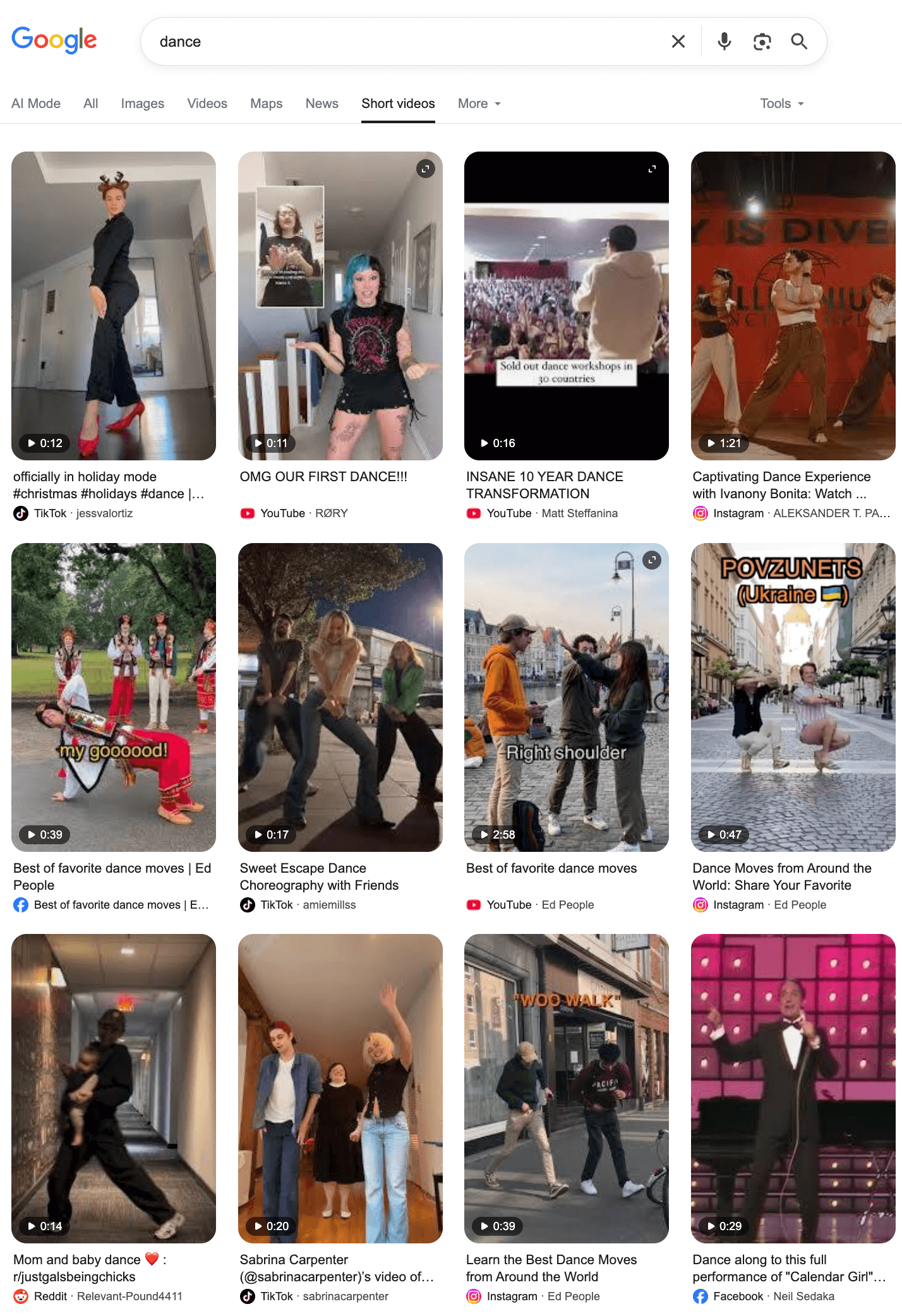
https://www.searchapi.io/api/v1/search?engine=google_shorts&q=dance- Python
- Node
- Ruby
- Java
- Go
- PHP
- Bash
- R
- Kotlin
- Swift
- C#
- C
- C++
- requests
import requests

url = "https://www.searchapi.io/api/v1/search"
params = {
  "engine": "google_shorts",
  "q": "dance"
}

response = requests.get(url, params=params)
print(response.text)
{
  "search_metadata": {
    "id": "search_8qWVwGvboYPYTaNZgmDQJaN4",
    "status": "Success",
    "created_at": "2025-11-25T18:06:41Z",
    "request_time_taken": 1.84,
    "parsing_time_taken": 0.03,
    "total_time_taken": 1.86,
    "request_url": "https://www.google.com/search?q=dance&oq=dance&gl=us&hl=en&udm=39&ie=UTF-8",
    "html_url": "https://www.searchapi.io/api/v1/searches/search_8qWVwGvboYPYTaNZgmDQJaN4.html",
    "json_url": "https://www.searchapi.io/api/v1/searches/search_8qWVwGvboYPYTaNZgmDQJaN4"
  },
  "search_parameters": {
    "engine": "google_shorts",
    "q": "dance",
    "device": "desktop",
    "hl": "en",
    "gl": "us"
  },
  "search_information": {
    "query_displayed": "dance",
    "total_results": 160000000,
    "time_taken_displayed": 0.25,
    "has_no_results_for": false
  },
  "shorts": [
    {
      "position": 1,
      "title": "officially in holiday mode #christmas #holidays #dance | dance",
      "link": "https://www.tiktok.com/@jessvalortiz/video/7576365335935339806",
      "source": "TikTok",
      "author": "jessvalortiz",
      "length": "0:12",
      "thumbnail": "data:image/jpeg;base64,/9j/4AAQSkZJRg..."
    },
    ...
  ]
}